Why a delivery entered as a purchase — not an adjustment — is what keeps your costing honest.
Recording a purchase — vendor, quantity and cost in one entry.
Selling price and cost are kept deliberately apart: an item’s selling price lives on the item, and cost arrives with each purchase. No adjustment or scan will change what you charge customers.
You have…
Use
Because
Stock you bought from a vendor
Purchases
Adds stock and records the vendor and cost, which feeds your weighted average cost.
A stock count, damages, expiry or shortages
Stock Adjustments
Moves stock up or down without a vendor or a payment.
New selling prices for items you already sell
Prices
Changes price only — never quantity, never cost.
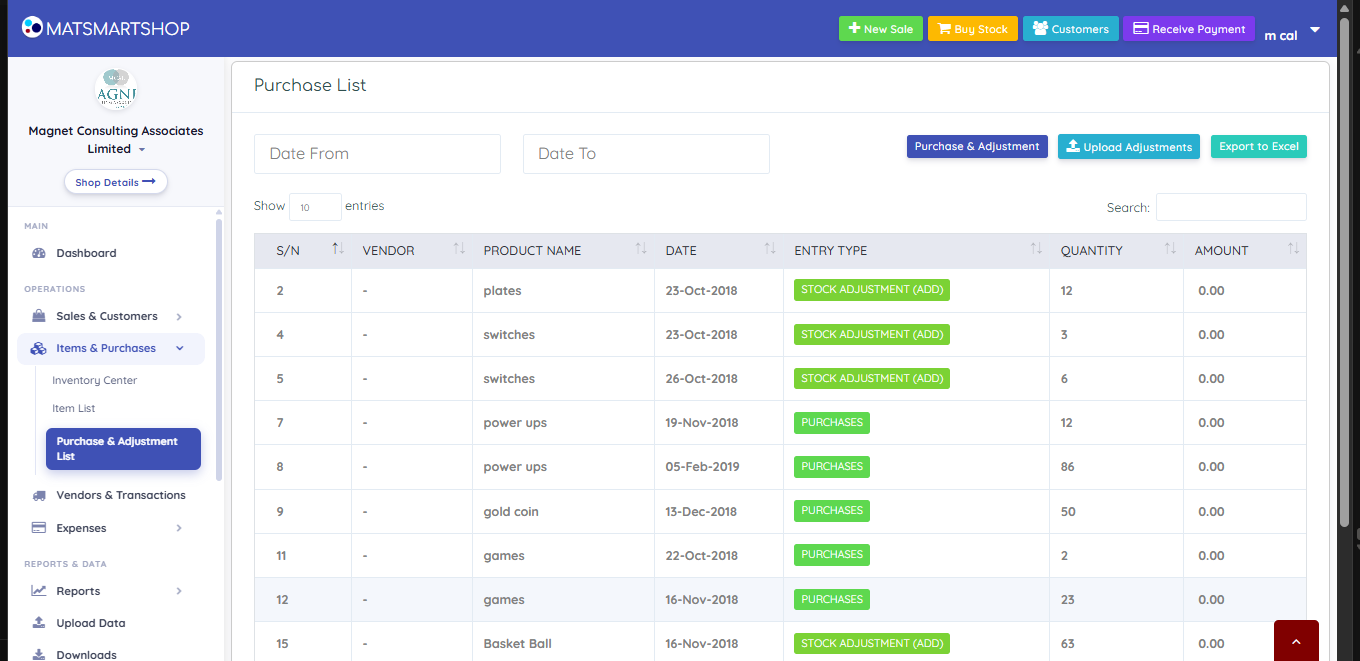
Purchases and Stock Adjustments are not interchangeable. Putting bought stock through the adjustment route loses the vendor and the cost — and an adjustment entered at zero cost drags your weighted average cost down, quietly inflating the profit on every later sale.
Purchase List — every movement, badged by status.
On Android, the Purchase List’s Status column is the one to read: Opening (stock the item started with), Purchase (bought from a vendor, with a cost) and Adjustment (a correction). ENTER PURCHASE records a new delivery.
If something looks wrong
A loss shows with zero expenses — usually means cost of sales exceeded sales because stock was brought in as zero-cost adjustments rather than purchases with real costs.
The web purchase page changed in October 2026. Purchase & Adjustment List -> Record stock now takes a whole vendor bill or stock count on one form (Purchase, Add stock or Remove stock), and the Scan a paper tab reads a supplier's receipt for you. The video and pictures above show the older form; the rule about purchases and adjustments is the same. See the "Record stock" article.